
- @focus marketing ideas – Web Activity Search
- marketing ideas for small business
- marketing ideas on a budget
-
 Start Focus Session
Hide 3 sites for 30 minutes
Start Focus Session
Hide 3 sites for 30 minutes
Focus Sessions for your search
Search without the distractions.
Web Activity hides the sites that pull you away from your search results, for as long as you choose. Start a session right from your search suggestions.
- Starts from the address bar
- 15 minutes or until you stop
- Ends on its own
How it works
One session, start to finish.
Set it up once. After that, everything happens in your search suggestions.
-
Set up
Choose what to hide, and for how long.
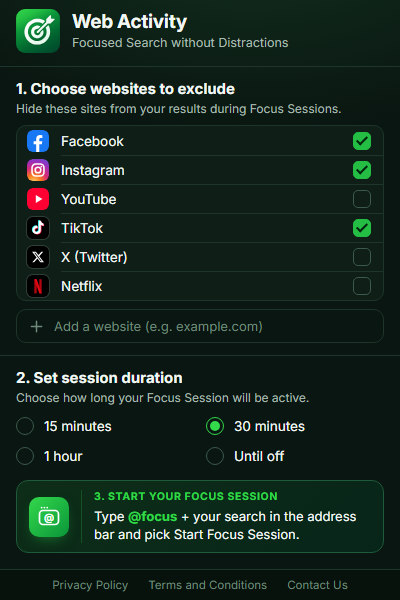
Open Web Activity from the toolbar. Tick the sites that distract you, add your own, and pick a session length.
-
Start
Type @focus and your search.
Pick Start Focus Session from the suggestions. Your session starts and your first search is already focused.
-
Search
Every search stays focused.
While the session runs, the sites you picked are left out of your results. Search as usual — nothing else to do.
Not in your results: facebook.com • instagram.com • tiktok.com
-
Stop
Stop anytime, from any search.
During a session, Stop Focus Session shows up in your suggestions with the time left. Pick it to search without filters again.
Your rules
You pick what disappears.
You pick what disappears.
And for how long.
No lists made for you, no lockouts. Web Activity only hides the sites you choose, only while a session is on.
- Hide
-
- YouTube
- TikTok
- X (Twitter)
- Netflix
- Any site you add
- For
-
- 15 min
- 30 min
- 1 hour
- Until off
- Start with
-
@focus + your search, then Start Focus Session.
Focus for a while. Then get back to normal.
When the time runs out, the session ends by itself and your searches go back to how they were. Nothing to switch off.
Add to Chrome — It’s Free